CRM Consulting: Selection, Costs and Implementation for Mid-Sized Companies
14 min read
Anyone searching for CRM consulting ends up almost exclusively on pages that sell CRM consulting. They tell you the provider is vendor-neutral, experienced and close to the customer. What they rarely tell you: what a project costs, how long it takes, why it fails and when you don't need a consultant at all.
Here you get the answers: what CRM consulting delivers, which CRM system suits which company, how a CRM implementation unfolds in six phases and what costs you should expect. We cite market figures with their source, license prices with their date, and we label our own benchmarks as such.
What CRM consulting delivers and when you don't need it
A CRM system is first and foremost a shared memory: Who agreed what with which customer and when, and what is the next step? Forecasts, automation and AI build on top of that. CRM consulting makes sure this memory fits the company and is maintained in everyday work.
The three services of CRM consulting
Clarify
Set goals, document the sales process, separate requirements into must-haves and nice-to-haves. The result is a document you can use to compare vendors.
Select
Check systems against the requirements, make offers comparable, calculate license models. The result is a well-founded recommendation.
Implement
Data model, configuration, migration, training and the weeks after go-live. The result is a system the team actually works with.
Many providers sell all three services from a single source. That is convenient, but it has a consequence: whoever earns money from the implementation rarely recommends a system they can't implement.
Who advises, and with what interest
Who
Vested interest
Fits when
Vendors and sales partners
License revenue, often with commission
The choice of system has already been made
Independent CRM consultants
Consulting days, no implementation
The selection is open and contested
Implementation partners and agencies
Project scope, limited to the platforms they implement themselves
You want consulting and implementation from a single source
Internal project team
None, but little time
The process is simple and the team has capacity
Ask every consultant two things: Which vendors do you have partner agreements with? And when did you last advise against a CRM project?
When you can do without consulting
Our rule of thumb from projects: you don't need CRM consulting if three things apply. No more than five people work in sales, the process runs in a straight line from inquiry to quote to order, and no second system holds the same customer data. In that case, take a standard CRM, set up a pipeline with four or five stages and work with it for four weeks.
Consulting pays off as soon as several departments look at the same customers, an ERP or a shop needs to be connected, data has to move over from a legacy system, or a first attempt has already failed.
How widespread CRM systems really are
The answer depends on the definition. Two surveys arrive at very different figures:
91%
of companies with 20 or more employees use a CRM application for digital management of customer data
Bitkom, Digital Office Index 2024
30%
of companies in Germany with ten or more employees use CRM software
The larger the company, the more likely it is to have a CRM. In the small Mittelstand, the majority works without one. Source: Eurostat, dataset isoc_eb_iip (2025 survey).
Across Europe, too, usage grows with company size, from 25 percent among small companies to 65 percent among large ones (Eurostat news item of 20 May 2026).
Both figures are correct; they simply measure different things. Almost everyone manages customer data digitally, often in their ERP, in Outlook or in a spreadsheet. A system where sales tracks its opportunities and management reads off its forecast is something most of the small Mittelstand doesn't have.
Why CRM Projects Fail, and What the Evidence Shows
"70 percent of all CRM projects fail" is a line you'll find in almost every presentation. We couldn't find an original source for that figure, so we don't rely on it.
A more reliable assessment appears in the Harvard Business Review. The piece is the view of a sales consultant, not a study of its own. It says of an analysis by CIO magazine: "around one-third of all customer relationship management (CRM) projects fail." And it continues: "That was actually an average of a dozen analyst reports. The numbers ranged from 18% to 69%." (Edinger, HBR 2018). So the honest answer is: somewhere between a fifth and two thirds, depending on what you call failure.
More important than the failure rate is the reason the author gives. CRM systems miss their goal "because they are too often used for inspection, rather than creating improvement in the sales process." The CRM serves control rather than selling. People who enter data get nothing back.
Two surveys show how much technology sales teams already have to deal with:
28%
of their week is what salespeople spend actually selling
Salesforce 2022, 7,775 respondents
10
tools is how many sales teams use on average to close a deal
Salesforce 2022
50%
of B2B salespeople feel overwhelmed by the amount of technology
Gartner 2024, 1,026 respondents
According to Gartner, overwhelmed salespeople are 45 percent less likely to reach their targets. The Salesforce figures come from a vendor, so they're an indication rather than proof. For sales, a new CRM is initially just an eleventh tool. It only gets used if it takes work off their plate.
From implementations and rescue projects, we know six patterns that keep repeating.
Pattern 1
No clear goal
"We need a CRM" is what the project brief says.
Remedy: three to five goal statements, each with a role and a metric.
Pattern 2
Nobody maintains it
Reports are still created in Excel.
Remedy: Every role gets something back.
Pattern 3
Poor data at launch
Duplicates and contacts from 2015 move over too.
Remedy: clean up before the import.
Pattern 4
Over-configuration
Forty mandatory fields, twelve stages.
Remedy: Every field needs someone who uses it.
Pattern 5
Tool before process
The license is bought, the workflow undocumented.
Remedy: write down the sales path first.
Pattern 6
An island with no connections
Everything gets typed in twice.
Remedy: connect email and calendar from day one.
Which CRM system fits: four approaches for mid-sized companies
Before you compare products, it's worth looking at the different types of CRM.
Option 1
Excel and Outlook
Strength: Costs nothing, and everyone knows it.
Limit: No shared view, no history.
Fits if no more than about three people work in sales (rule of thumb).
Option 2
Standard CRM
Strength: Quick to get started, clear workflows.
Limit: Limited support for your own processes.
Fits if your process is close to the textbook.
Option 3
CRM suite
Strength: Sales, service and marketing in one.
Limit: Licensing and implementation cost more.
Fits if several departments will use it and closeness to the ERP matters.
Option 4
Platform CRM: Dataverse and a custom app
Strength: The platform provides the data model, permissions and reporting, and the interface fits your workflow exactly.
Limit: Needs development and ongoing maintenance.
Fits if your process is your competitive advantage and Microsoft 365 is already in place.
Standard CRM means tools like HubSpot in its smaller editions or Pipedrive: switch it on, set up a pipeline, get going. Suites like Salesforce or the Microsoft CRM Dynamics 365 cover several departments and can be customized in depth.
The fourth option separates data from interface. Microsoft Dataverse is the data foundation: data model, roles and permissions, sign-in via Microsoft 365, plus Power Automate and Power BI without detours. The data stays in the Microsoft cloud in the region you choose. On top of that sits a custom-developed application for browser, tablet or smartphone that shows only what your workflow needs. Unlike an app from the Power Apps builder, there are no design constraints, and external users such as dealers or customers can be included too. This option fits when several user groups work with the same data and the interface has to fit exactly. Depending on the scenario, licensing involves Dataverse capacity and access licenses. Clarify this before the project using Microsoft's licensing guide.
« swipe »
Three questions for a first direction. They don't replace a selection process with a requirements catalog, but they spare you conversations with vendors who would never have fit.
Inquiry, quote and close in a single line are standard. Project business, dealer tiers or framework agreements with call-offs over several years are more specific. Be honest with yourself here: many companies are more ordinary than they think.
CRM selection: how to compare vendors
For the actual CRM selection, you need a matrix. The rows list your requirements, sorted into must-have, should-have and nice-to-have. The columns list the vendors. Each cell gets one of three answers: works in standard, works with customization, doesn't work.
The middle answer is the expensive one. So have every "works" demonstrated live, using one of your real cases. Our rule of thumb: if a vendor has more than two must-have rows that only work with customization, they don't fit your process. Or your must-have is really a should-have.
The Major CRM Platforms Compared
Four names come up in almost every shortlist for mid-sized companies. The assessment is based on our projects and on vendor information.
The logos are trademarks of their respective owners and are used here for identification only.
Platform
Strengths and limits
Fits if
Microsoft Dynamics 365 and Dataverse
Closely integrated with Outlook, Teams and Excel, and you can add your own tables and workflows. The licensing model has many variants
You already work with Microsoft 365 or need custom objects alongside sales
Salesforce
Broad range of functions, many ready-made extensions, extremely customizable. The highest list prices of the four in the upper editions, and the scope requires ongoing maintenance
The sales team is large or international, and you have the capacity to maintain it
HubSpot
Marketing and sales on one data foundation, quick to learn, free entry level. The larger editions cost significantly more
New customers come mainly through your website, content and campaigns
Pipedrive
Focused on the pipeline, quick to get started, low price. Hardly any service or marketing features
A small team needs a pipeline and little else
The boundaries are fluid. HubSpot starts as a standard CRM and, with its larger editions, extends into the suite class. Dynamics 365 and Salesforce can also be introduced in a lean way if you start with one module.
What the Licenses Cost
The table shows prices per user and month from the vendors' pricing pages, as of 20 November 2026. Discounts, minimum quantities and add-on modules are not included.
Starter €7 (promotional price), Professional €90, Enterprise €175
Per license, billed annually. According to the page, the Starter price is discounted for a limited time. Professional and Enterprise require a one-time onboarding fee, whose price HubSpot states during checkout
Never compare only the smallest edition. What matters is the edition that includes your must-have requirements.
Introducing a CRM in Six Phases
It starts with a goal you can verify. A useful formula: with the CRM, a specific role will be able to make a specific decision, measurable by a metric by a certain date. "More transparency in sales" fails this test. "The head of sales sees every Monday all quotes older than 14 days" passes it. Write down three to five sentences like that. Anything that serves none of them stays out of the first version.
If you want to introduce a CRM, it's best to follow this sequence:
« swipe »
Roadmap for a focused CRM rollout with one module. The phases deliberately overlap: configuration starts as soon as the data model is in place.
The roadmap shows the fastest realistic case for a single module with little customization. By our benchmarks, such rollouts take two to four months, because coordination and data cleanup take time. Multiple modules, a migration from a legacy system and interfaces to ERP or a shop extend the project to four to nine months. In that case, plan two small launches rather than one big one.
Rule of thumb
A phase only counts as a phase if, at its end, something has changed that a third party can verify.
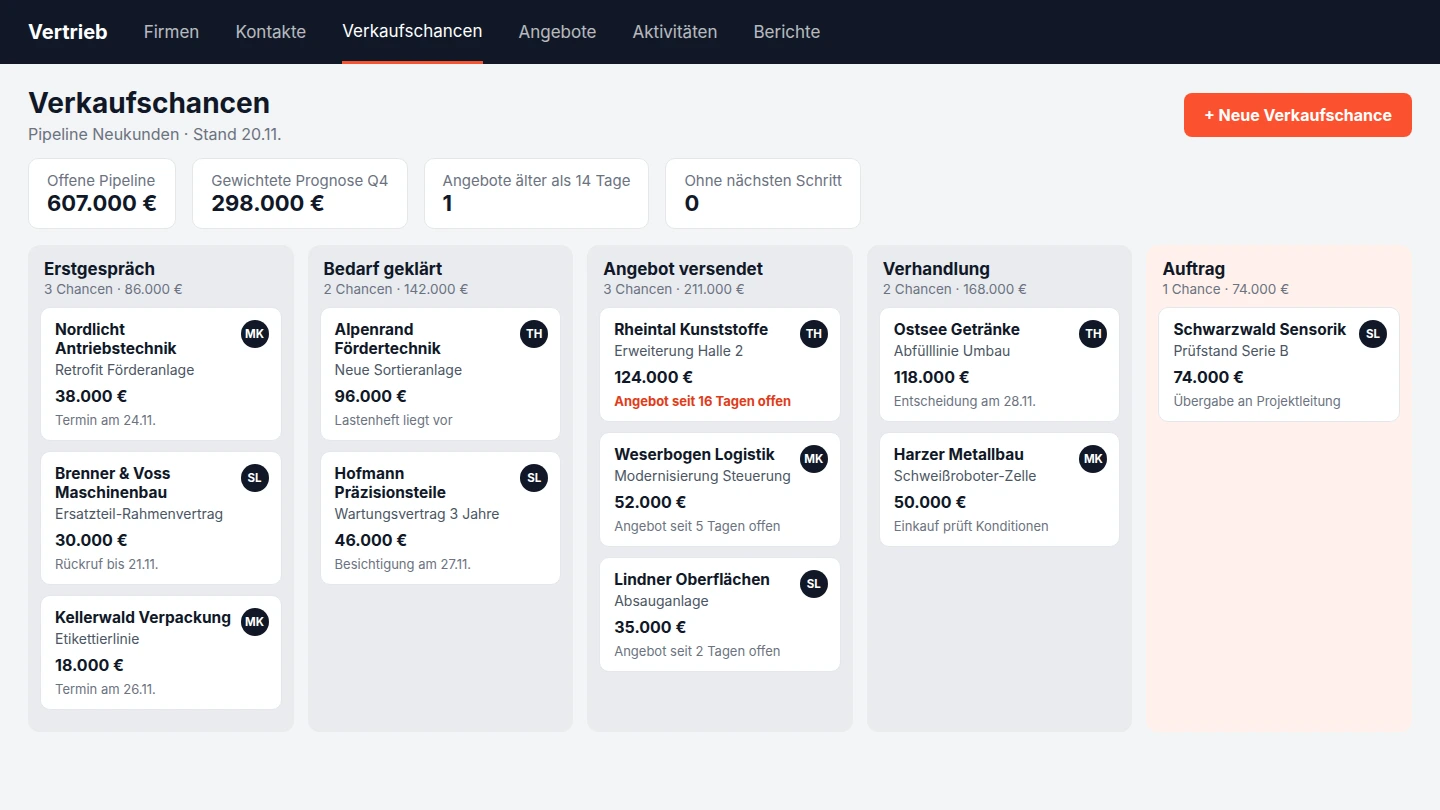
"In progress" is a status, not a phase. Here is what a pipeline view that follows this principle can look like:
Schematic illustration. All company names and amounts are fictional.
The view answers two questions without a report: Which quote is stuck, and which opportunity has no next step?
The Data Model Decides the Next Five Years
Interfaces can be changed later, but the data model can hardly be. That is why it belongs on a single page before anyone creates the first field.
« swipe »
Five objects are enough for the first version. The opportunity is the center: quotes and activities hang off it, and it belongs to a company and its contacts.
You settle four questions in the model:
Relationships: Does a contact belong to one company or to several? Is an opportunity tied to a single company or to a group with subsidiaries? This is where the most expensive late changes come from.
Fields: For each object, include only details that someone uses weekly. Use picklists for fixed values rather than free text.
Keys: How do you uniquely identify a record? Without a business key such as the customer number from the ERP, every interface creates duplicates.
System of record: Which system is the leading one for which piece of information? Two leading systems for the same address result in two versions of the truth.
Medienstürmer advises independently of vendors on selection and implementation, and delivers on three platform ecosystems: Microsoft with Dynamics 365 and Dataverse on the Power Platform, Salesforce, and HubSpot. On top of that comes the fourth route from above, Dataverse with a custom app. We are not neutral in the strict sense: we are an implementation partner for several platforms. We do not implement Pipedrive or other systems. If one of them fits better, we will tell you. Our own CRM is an example of the fourth route: companies and contacts live in Dataverse, opportunity, quote, order, and invoice are separate tables, and on top sits a custom interface that also includes projects and documents. The platform for our reference client Stallwissen is built on the same pattern. For our CRM, the real work was the data model, not the interface.
„We built our own CRM and have implemented CRM systems for clients. The software was rarely the issue. It got difficult whenever nobody had said beforehand which decision the CRM was supposed to make easier.“
Felix StürmerManaging Director, Medienstürmer
Migration and Adoption: Where a CRM Wins or Loses Trust
After the first wrong answer from the new system, the team goes back to the old list. So bring along only what someone needs and takes responsibility for, and clean it up before the import.
Data
Migrate?
Do beforehand
Companies
Yes, if active in the last three years
Merge duplicates
Contacts
Yes, with company and role
Flag people who have left
Open opportunities
Yes, all ongoing ones
Update stage and amount
Old history
Read-only or as an archive
Don't reshape it, just file it away
Adoption is decided with every field you create or leave out. Two levers work best: Leadership works in the system itself and stops asking for Excel lists. And people who maintain data get something back, such as follow-up reminders, ready-made quotes, or fewer questions. You can find all six levers and the three-pass migration process in the whitepaper.
CRM Costs: Consulting, Implementation, and Licenses
Costs consist of three parts: the project, the licenses, and operations. Most quotes show only one of them.
The following ranges are our benchmarks for mid-sized companies, net and excluding licenses. They are no substitute for a quote, but they show the order of magnitude.
Component
Benchmark
Scope
Strategy workshop
from €2,500
Goals, process, selection recommendation
Focused implementation
€15,000 to €45,000
One module, little customization, 2 to 4 months
Implementation with migration
€45,000 to over €120,000
Several modules, interfaces, 4 to 9 months
Operations and further development
15 to 25% of project costs per year
Maintenance, updates, small enhancements
The software rarely drives the price. It rises with the number of interfaces, the quality of legacy data, and every special rule. This applies to all platforms: a lean tool with a single pipeline sits at the lower end, while a suite with several modules lands in the upper range regardless of vendor.
Licenses are charged per user per month and grow with the team. The prices of the major platforms are in the comparison table above. For an application built with the Power Apps toolkit, Microsoft lists €17.30 per user per month for Power Apps Premium (Microsoft pricing page, as of 20 Nov 2026, annual billing, plus VAT).
Worked example over three years
€68,000
Ten users on Dynamics 365 Sales Professional, a focused implementation, and three years of operations add up to roughly €68,000. Anyone who only compares license prices is comparing less than a third of the costs.
Assistants like Copilot are now built into almost every CRM. How useful they are depends on the data that's already there.
Use case
Assessment
Condition
Summarizing call notes and saving them to the contact
Works
None
Customer history on one page before the meeting
Works
Activities are kept up to date
Email drafts based on the conversation history
Works
A person reads and sends
Deal forecasts and lead scoring
With oversight
Only once the history is well maintained
Filling fields automatically from emails
With oversight
Spot-check the results
Sending quotes, prices or commitments without approval
Not recommended
Not even "just as a test"
AI amplifies what's in the CRM. With clean data, it saves time every day. With poor data, it delivers wrong answers faster. You can read more in our article on introducing AI in your company. For recurring processes around the CRM, such as quote approvals, take a look at our article on process automation.
Where do you stand? CRM maturity in four stages
Not every company needs the same project.
« swipe »
Four stages of CRM maturity. What matters is not where you stand, but that you know the next step and don't skip a stage.
The most common bad investment falls between stage two and stage three: a CRM gets replaced because nobody maintains it. Nobody maintains the new one either, because the cause hasn't changed.
Mini checklist: ready to start?
These seven points are the short version of the checklist in the whitepaper. If one is missing, it's better to postpone the start by a week.
Three to five goal statements are in place, each with a role, a metric and today's baseline value.
Everyone involved describes the phases and handovers of the sales process in the same way.
The data model fits on one page and has been proofread by someone who wasn't involved.
Duplicates are merged, legacy data is weeded out, and the cutoff date is set.
Emails and appointments land on the right contact without copying.
Everyone has entered their own ongoing deals themselves.
For the first four weeks, there is a fixed office hour and a channel for feedback.
You'll find the detailed templates in the free whitepaper "CRM Consulting for Mid-Sized Companies". They range from the requirements questionnaire and the sales process profile to the selection matrix.
Frequently asked questions
What does a CRM consultant do?
A CRM consultant works with you to clarify goals and the sales process, translates both into requirements, compares systems, and supports the rollout, from the data model and migration through to training. Good consultants will also advise against a project if a standard CRM is enough.
How much does CRM consulting cost?
By our benchmarks, a strategy workshop starts at around €2,500. A focused rollout with one module costs €15,000 to €45,000 and takes two to four months. A rollout with migration and interfaces costs €45,000 to over €120,000 and takes four to nine months. Licenses and operations come on top.
Which CRM system suits a mid-sized company?
That depends on the process, not on company size. For a standard workflow, a standard CRM like HubSpot or Pipedrive is enough. If several departments work with the same customers, a suite like Dynamics 365 or Salesforce fits. If your sales process is your competitive advantage and Microsoft 365 is already in house, Dataverse with a custom app is an option.
What's the difference between Dynamics 365 Sales and a CRM built on Dataverse?
Dynamics 365 Sales is a ready-made sales application from Microsoft with pipeline, quotes and forecasting. A custom CRM on Dataverse uses the same data platform, but brings its own tables and its own interface. Dynamics costs more in licensing, while the custom CRM costs more in development.
What do I need to consider regarding CRM and GDPR?
A CRM processes personal data. With a cloud provider, you need a data processing agreement, because under Art. 28(3) GDPR processing is carried out "on the basis of a contract or other legal act" (Art. 28 GDPR). You also need a legal basis for each type of data, retention periods and a permissions concept. For providers from the US, the basis for the data transfer is part of this too. This paragraph is not legal advice. Details on the Microsoft platform can be found in the article Using Power Apps in a GDPR-compliant way.
Good CRM consulting doesn't start with the software. It first clarifies which decision the CRM should make easier, then the sales process and the data model, and only after that the system. There's good reason to think that CRM projects fail above all when the system serves control and gives nothing back to the team. Calculate the costs over three years, covering project, licenses and operations. And choose the platform based on the requirements catalog, not on the best-known name.
Let's talk about your CRM project
In the initial call, we look at goals, process and system landscape. You'll get an assessment of which platform fits: Dynamics 365, Salesforce, HubSpot or Dataverse with a custom app. This holds true even if it doesn't turn into a project with us.
Bitkom: 4 out of 10 companies work paperless, press release on the Digital Office Index 2024, dated 24 September 2024. 1,103 companies with 20 or more employees.
Eurostat: Dataset isoc_eb_iip, indicator on the use of CRM software, Germany and EU, 2025 survey. Accessed on 20 November 2026.
Image credits: Cover image is a collage of photos by Ketut Subiyanto and Mikhail Nilov (both Pexels) and original graphics. Logos via Wikimedia Commons (classified there as public-domain word marks), trademarks of the respective manufacturers. Images marked "AI-generated" were created with an image model.