Let us assess your app – with real numbers
Tell us in 30 minutes what the app should do. We'll tell you which path fits and what price range you'll land in – even if the answer is standard software.
Anyone who wants to have an app developed quickly ends up with three quotes and three prices that are far apart, for what looks like the same app. That is rarely because of dubious providers. It's because each one understood something different: different data, different interfaces, a different scope.
This guide covers business apps in mid-sized companies: the app for field service, the internal tool that replaces an Excel list, the portal for customers or partners. It shows you which of four paths fits (standard software, low-code, Dataverse with a custom app, or fully custom software), what the build and the five years after it cost, how a project runs, and how to lay quotes side by side so the price comparison actually means something.
Almost everything you find on the topic is about consumer apps: jogging trackers, delivery services, startup ideas, app store rankings, in-app purchases. For a mid-sized company, those are the wrong yardsticks. A business app doesn't need to be found in the App Store; it needs to talk to the ERP. Its success is measured not in downloads, but in days until the invoice.
The need is there, and the specialists for it are scarce:
of mid-sized companies completed digitalization projects between 2021 and 2023
KfW Digitalization Report for the Mittelstand 2024was spent by the Mittelstand on digitalization in 2023 alone
KfW Digitalization Report for the Mittelstand 2024IT specialists are missing in Germany
Bitkom, September 2026According to the KfW report, the most common type of project is digitalizing contact with customers and suppliers. In practice, you'll encounter three types of business apps:
| Type and user | Typical examples | What it usually depends on |
|---|---|---|
| Internal app for employees with a company account | Approvals, inventory, inspection reports, order management | Data model and permissions |
| Field service app for technicians, sales, and installers on the road | Service reports, measurements, photo documentation, signatures | Offline capability, ERP integration |
| Customer or partner portal for external users with their own login | Orders, service tickets, documents, training videos | Login, licenses for external users, data protection |
This classification is more than sorting work. It determines which way of building is even an option, and which cost items will show up on the invoice later. If you're mainly concerned with customer data, sales, and quotes, first check whether a CRM system is the better answer. You can read more in our article on CRM consulting.
"Having an app developed" sounds like one decision, but it is really a choice between four paths. Before you look for a service provider, work out whether off-the-shelf software is enough. Then ask whether a low-code platform like Microsoft Power Apps will do, whether a custom interface on top of Microsoft Dataverse fits, or whether you need fully custom development. Three questions point you in a first direction:
The decision tree helps you avoid the two most expensive mistakes. One is paying for custom software to solve a problem that has long since been solved. The other is forcing a process that sets you apart from others into someone else's form.
Payroll, accounting, time tracking, travel expenses: here you share the development costs with thousands of other customers. Check honestly whether a standard tool covers 80 percent of your process. If the missing 20 percent doesn't hurt, take the tool. If it hurts every day, calculate what the workaround costs per year. That figure is your budget frame for everything that follows.
Power Apps is Microsoft's low-code platform. It stands in for low-code here because Microsoft 365 is the environment most mid-sized companies already have. Without a Microsoft environment, other low-code platforms come into question, or you go straight to the custom route. In mid-sized companies, its advantage is less the "no programming" part than the environment: sign-in, permissions, Teams and SharePoint are already there. A data-entry app built on a list can be live in a few weeks. For anything more, you need a clean data model in Dataverse. Field service is no reason to rule it out either. According to Microsoft Learn, Dataverse-based canvas apps can also run without a network connection (offline-first). Changes are synchronized as soon as a connection is available again.
The catch is licensing. Microsoft 365 licenses only get you as far as standard connectors reach. Once Dataverse, premium connectors or custom interfaces come into play, Microsoft's licensing FAQ says each user needs a standalone Power Apps license. The comparison Canvas, Model-Driven and Power Pages shows which app type suits which purpose.
Between low-code and fully custom development lies a fourth path that few providers mention. Microsoft Dataverse serves as the data foundation, with a custom-built interface on top for web, tablet or phone. Dataverse supplies the data model, roles and permissions, and sign-in with the Microsoft 365 account. Power Automate and Power BI can be connected directly, and the data stays in the company's Microsoft cloud. The interface, by contrast, follows your process exactly, without the design limits of Power Apps, and it can also be open to customers or partners.
This path fits when your process is your advantage, several user groups need access, Microsoft 365 is already in place, and you want to analyze and automate. It has limits too. You need a team that masters both worlds, and Dataverse incurs capacity costs and, depending on the scenario, access licenses. You clarify this with the provider and the Microsoft pricing page before the build.
A fully custom-built web application runs in the browser on any device. It has its own login and its own data storage, and it belongs to you, source code included, if you agree that properly. It is the right path when no Microsoft environment is in place, when the app itself is meant to become a product, or when a platform's license bill grows with every user. The trade-offs are covered in detail in Low-Code vs. Pro-Code and in the guide Custom Software Development.
You need a dedicated app for iOS and Android less often than most people think. It makes sense when a camera, scanner, push notifications or extended offline work are core to the use case. A business app doesn't have to go into a public app store for that. For internal company software, Apple provides what it calls Custom Apps, which are visible only to specified organizations and distributed through device management. On Android, private apps in Managed Google Play offer a comparable route.
Path 1
Fits when the process works like everyone else's.
Path 2
Fits when the users are internal and you already have Microsoft 365.
Path 3
Fits when there is no Microsoft environment or the app becomes a product of its own.
Path 4
Fits when the process is your own, several user groups need access, and you already have Microsoft 365.
A mobile app is not a fifth path here, but a form factor of paths 3 and 4: the same effort, plus store work and updates for two operating systems.
The practical example further below shows the fourth path. Data and permissions stay where they are, and only what users actually see gets built from scratch.
Market overviews usually quote a range "between €15,000 and €100,000" for custom-developed apps (OMR Reviews). That doesn't help much, because it ignores the cheaper routes and the follow-up costs. It gets more precise once you separate by build approach and size. The ranges below are based on experience from our projects – build effort only, excluding licenses and operations. The derivation for Power Apps is in the article Power Apps: Costs and Project Duration.
| Project | Build price range and duration | Typical case |
|---|---|---|
| Small Power App | €4,000–15,000 · 3–6 weeks | Canvas app on a list: data capture, checklist, simple approval |
| Medium Power App | €15,000–45,000 · 2–4 months | Dataverse, roles, business rules, one to two integrations |
| Large Power Platform solution | €45,000–120,000 and more · 4–9 months | business-critical, many integrations, large user base |
| Custom MVP | €15,000–30,000 · 4–8 weeks | Web or mobile prototype with the core features |
| Custom enterprise app | €50,000–250,000 · 3–9 months | production-ready, with interfaces, roles, and an operations concept |
A custom app on Dataverse falls within the range of the two custom rows, depending on the scope of the user interface; what you save is building data storage, permissions, and sign-in yourself.
Four factors determine where you land within a range: how complex the data is, how many business rules the app has to know, how many systems are connected (every interface is a small project of its own), and how many people use it.
Anyone who names a price without knowing the data, rules, interfaces, and number of users is guessing.
The most common misconception about app development costs: people see the screens and mistake them for the work.
For your budget, this means: a quote that only says "development" shows you a fraction of the project. If testing and data migration are missing as separate line items, they aren't free, they're forgotten.
These items rarely appear in the first quote. The official prices, as of 20 November 2026:
| Item | Official price | Source |
|---|---|---|
| Power Apps Premium | €17.30 per user per month, billed annually, plus VAT (from 2,000 licenses €10.40) | Microsoft |
| Additional Dataverse database capacity | €34.70 per GB per month | Microsoft |
| Power Pages, authenticated external users | €173.30 per 100 users per website per month | Microsoft |
| Apple Developer Program | US$99 per year | Apple |
| Google Play developer account | one-time US$25 |
Store fees are the smallest item; review times and mandatory updates when Apple and Google renew their operating systems are more expensive. For licenses, a back-of-the-envelope calculation is worthwhile before you build.
Example calculation: licenses over five years
€25,950
That's what 25 field service employees with Power Apps Premium cost over five years, net. That can be more than the cost of building a small app.
On top of that come operations and maintenance: hosting, monitoring, backups, security updates, adjustments for changed interfaces. A realistic figure is 15 to 25 percent of the build cost per year. This is a value based on experience from our projects, not an industry average; brokerage platforms such as appfelsine cite similar magnitudes at around 10 to 20 percent.
That's why you should compare quotes over five years: build plus operations, maintenance, and licenses. The cheapest quote is rarely the one with the lowest total cost. And give further development a fixed annual budget; that's cheaper than negotiating every change individually as an add-on order.
First calculate what the current situation costs. Three employees who spend 40 minutes a day on a workaround add up to two hours per working day – at 220 working days, 440 hours a year. Multiplied by your fully loaded hourly rate, that gives you the sum every app has to beat. If it's below the app's annual total cost, the answer is standard software or nothing at all.
Every proposal should show these six phases, whichever route you take:
What you should have in hand at each phase:

You define the scope of version 1 together, before the first proposal arrives (symbolic image, AI-generated).
That leaves the question of who builds it. Setting up an in-house development department isn't an option for most mid-sized companies: according to Bitkom, 97 percent of companies with IT positions struggle to fill them. That's why most have their software developed externally instead of hiring developers themselves – and as clients, they need to know what they're ordering.
No service provider needs a 40-page requirements document. They need one page that settles four things:
If you can't answer one of these four points in two sentences, a decision is missing, and no service provider will make it for you. Also write requirements so they can be estimated and checked off later:
| Not like this | Like this |
|---|---|
| The app should be intuitive and modern. | A new technician records their first report in under 5 minutes without any training. |
| Integration with our ERP. | Orders arrive from the ERP every 15 minutes via REST API, and reports are sent back as PDFs. |
| The app must also work offline. | Reports can be recorded without a network connection and are sent automatically once a connection is available. |

Quotes can only be compared once all providers have priced the same description (illustrative image, AI-generated).
Hold each quote up against this list. Whatever is missing, you ask about in writing – before you compare prices, not after.
| Section | The check question |
|---|---|
| Scope and boundaries | Are the Version 1 features listed individually, and does it state what is not included? |
| Effort per phase | Are concept, design, development, integrations, testing and rollout itemized separately? |
| Pricing model | Fixed price, effort with a cap, or billing by time – and what happens when requirements change? |
| Ongoing costs | Are hosting, maintenance, support and licenses included with annual amounts? |
| Rights and handover | Will you receive the source code, documentation and all access credentials, and what does switching providers cost? |
| Acceptance and defects | What criteria apply for acceptance, and what response times apply afterward? |
A quote that is significantly cheaper but leaves testing, operations and rights open isn't cheaper, just more incomplete.
These questions show how a provider works when things get difficult:
Not automatically you. The rule under which a program belongs to the employer applies only to employed developers (§ 69b UrhG). If you commission an agency, the contract is what counts – and where it is silent, the scope of your usage rights is determined "by the purpose of the contract on which both parties based it" (§ 31 para. 5 UrhG). You don't want to rely on that. Have the following explicitly regulated: which usage rights you receive (including the right to modify the code and pass it on to another team), that the code is stored in a repository you have access to, and that documentation as well as admin and store accounts are held by you. This paragraph is general guidance, not legal advice; in the end, a specialist lawyer should review the contract.
If a contract for work (Werkvertrag) has been agreed, you are obliged to "accept the work produced in accordance with the contract"; you may not refuse acceptance because of insignificant defects. If the provider sets you a reasonable deadline after completion and you do not refuse acceptance within that deadline by naming at least one defect, the app is deemed accepted (§ 640 BGB). With acceptance, the situation turns: payment generally becomes due, the limitation period for defect claims begins, and from then on you have to prove defects. Defects you know about at the time of acceptance, you reserve in writing. When billing is based on effort, a contract for work is often not agreed – in that case there is no statutory acceptance, and you should write it explicitly into the contract. This too is general guidance, not legal advice.
These points should be done before you sign off on acceptance:
The one-page app profile, the question catalog, the comparison table for quotes and the complete acceptance checklist are available as fill-in templates in our free whitepaper "Commissioning a Business App" ("Business-App entwickeln lassen").
EDER GmbH, one of the largest Lely Centers in Germany, supports farmers who use Lely machines, from milking robots to feed pushers. When a hose needs replacing on the robot in the middle of the night, a manual won't help. A video from a professional will.
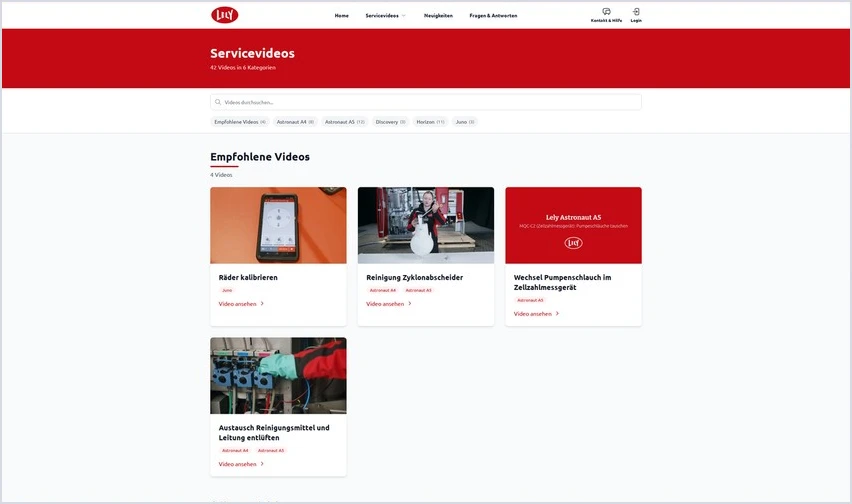
Stallwissen: overview of the service videos (screenshot of the platform).
The assessment: Customer base and permissions are stored in SharePoint and Dataverse, where the EDER service team already works. The users, however, are external customers, who also access the platform in the barn. So this was the fourth path: the data stays in the Microsoft world, and the interface was built as a custom web application.
The solution: Stallwissen is a platform with a login area, step-by-step videos from EDER technicians, playlists for each machine type and service tickets submitted directly from the platform. Which videos a farm sees is determined by the customer base in Dataverse. Behind it are a headless WordPress as the editorial system, a Nuxt frontend on Cloudflare Workers and Vimeo for streaming, which also works with unstable reception. No data is maintained twice.
The result: The platform has been in use for three years (as of July 2026), and the number of users keeps growing. Customers help themselves around the clock, and the service team gains time for the cases where it really matters. The full story is in the Stallwissen case study.
The lesson applies beyond agricultural technology: the paths aren't mutually exclusive. The best solution uses existing data and only builds new what users actually see.
„The most expensive apps I've seen weren't the ones with the highest quoted price. They were the ones where nobody had written down beforehand what version 1 must be able to do – and what it explicitly must not.“
We built Stallwissen at Medienstürmer, and our own hub for CRM, projects and quotes follows the same pattern, running on Dataverse with a custom interface. That's how we work in general: we develop business apps for mid-sized companies with Microsoft Power Apps and the Power Platform as well as custom-built web, tablet and mobile apps, and we support them in ongoing operation. For us, it starts with a conversation in which "just buy standard software" is also a valid answer. For an overview, see the page on app and software development.
AI-assisted programming is an everyday practice in 2026. It saves time where code is written: prototypes and clickable mockups take days instead of weeks, and so does standard code for forms, lists and tests. AI can suggest the architecture and data model, but an experienced person has to take responsibility for them, and only testing shows whether the code meets your business rule. Unchecked AI code that nobody on the team can explain becomes expensive once it runs in live operation.
Ask your service provider how they use AI and who reviews the code. The breakdown of effort above shows why quotes don't simply get cut in half: AI speeds up writing. Understanding the process, the interfaces and testing remain, and they make up a large share of the work even in custom development.
A small Power App costs €4,000–15,000, a medium one €15,000–45,000, a custom MVP €15,000–30,000 and a production-ready enterprise application €50,000–250,000. That is the build. On top of that come 15 to 25 percent of the build cost per year for operation and maintenance, plus licenses depending on the path.
A small Power App is ready in 3 to 6 weeks, a custom MVP in 4 to 8 weeks. A medium app with a data model and interfaces needs about four months from the first meeting to acceptance, and large applications up to nine. Decisions, access to third-party systems and testing with real data usually take longer than the programming itself.
No. A web app runs in the browser and doesn't need a store. Employees open a Power App via the Power Apps app or Teams. And for a custom iOS app, Apple offers private distribution to specified organizations through Custom Apps.
A web app runs in the browser on any device. A native app is installed on a phone or tablet and can make full use of the camera, scanner and push notifications. A Power App is built on Microsoft's low-code platform and runs in the company's Microsoft 365 environment.
The contract settles that; the law doesn't automatically decide in your favor. Explicitly agree on which usage rights you receive, that you may modify the code and hand it to another team, and that the repository, documentation and access credentials are held by you.
A fixed price makes sense when the scope is small and clearly described, for example for a concept phase and prototype. For the development itself, an effort budget with an upper limit is often more honest: you pay for what is needed, and the provider has to inform you before the limit is reached.
For a simple data entry form, often yes, and as a prototype it's helpful. What comes afterward is where it gets difficult: permissions, interfaces, data backup, updates – and the question of who maintains the app when the person who built it leaves.
Having an app developed is less a technical question than a procurement question. First clarify the path: buy, configure, build on Dataverse or program completely from scratch. Then calculate over five years rather than just the project price, because operation and maintenance make up about half of the total cost, with licenses on top. And give all providers the same one-pager with the goal, users, data and a negative list for version 1. Then you'll get quotes that can be compared – and an app that belongs to you after acceptance.
Tell us in 30 minutes what the app should do. We'll tell you which path fits and what price range you'll land in – even if the answer is standard software.