Let's Review a Process Together
We'll look at exactly one process with you and tell you honestly whether automation pays off or whether the money is better spent elsewhere.
Almost every mid-sized company has them: the Excel list that three people maintain, the approval that sits in someone's inbox, the figures someone types from one system into another. Everyone knows these things should be automated. Yet often nothing happens for years.
of mid-sized companies completed a digitalization project between 2022 and 2024, five percentage points fewer than in the period before
KfW Research, 2026of companies with 20 or more employees cite a lack of time as an obstacle to digitalization
Bitkom, 2026cite a lack of money
Bitkom, 2026The technology is rarely the problem. The tools for process automation exist and are affordable. What's missing are four decisions: Which process comes first? What type of tool? What will it cost in year three? And who owns the automation once it's running? Vendor websites don't answer these questions, because they're selling their product. This guide walks you through all four: with tool categories instead of vendor names, with figures, a worked example and a plan for the first 90 days. The figures above come from KfW Research and the Bitkom survey 2026.
Process automation means that a recurring task runs according to fixed rules, without anyone having to kick it off by hand or retype data. An event starts the process, such as an incoming invoice. Defined steps then follow: check, forward, approve, post, notify. People step in only where a real decision is needed.
That sounds like digitalization, but it isn't the same thing. Sending a paper form as a PDF by email means you've digitized it, not automated it: the process is the same, just without paper. A process is only automated once the handovers between people and systems happen on their own.
Workflow automation connects systems through their interfaces: a trigger starts a chain of actions. RPA (Robotic Process Automation) has a software robot operate the mouse and keyboard where there is no interface. BPM (Business Process Management) is the overarching discipline: describing, measuring and improving processes. AI doesn't replace any of these building blocks. It takes over individual steps for which there was previously no rule, such as reading a receipt.
The term process automation covers four very different classes of tools and one hybrid. If you confuse them, you either buy too much or build on a foundation that no longer holds after a year.
Way 1
For processes between systems that have an interface.
Examples: Power Automate, Make, n8n, Zapier
Limit: requires interfaces (APIs)
Way 2
For legacy systems without an interface.
Examples: UiPath, Power Automate Desktop
Limit: breaks when the user interface changes
Way 3
For processes in which people enter data and make decisions.
Examples: Power Apps, Mendix, OutSystems
Limit: little room for custom design and licensing
Hybrid
For custom processes with multiple user groups, if Microsoft 365 is already in place.
Setup: data foundation from Microsoft, custom interface
Limit: tied to the Microsoft platform
Way 4
For core processes with many or external users.
Examples: web application, portal, custom interfaces
Limit: higher entry cost, longer build time
Two questions will give you a rough idea of which way suits a specific process:
The normal case is a workflow. Most processes that companies want to automate are chains of a trigger and actions: something arrives, gets checked, passed on, confirmed. Workflow automation is enough for this, as long as the systems involved have an interface. Which tool fits depends mostly on which systems are already in use: Make and Zapier are strong when many cloud services from different vendors need to work together. n8n can be self-hosted, which matters when there are strict data sovereignty requirements. Power Automate is the obvious choice if the company already works with Microsoft 365. How well it works there and where its limits lie is covered in the article Power Automate in Business. If the interface is missing, first ask whether one can be built before you turn to RPA. You can find more under API Development: Connecting Systems Cleanly.
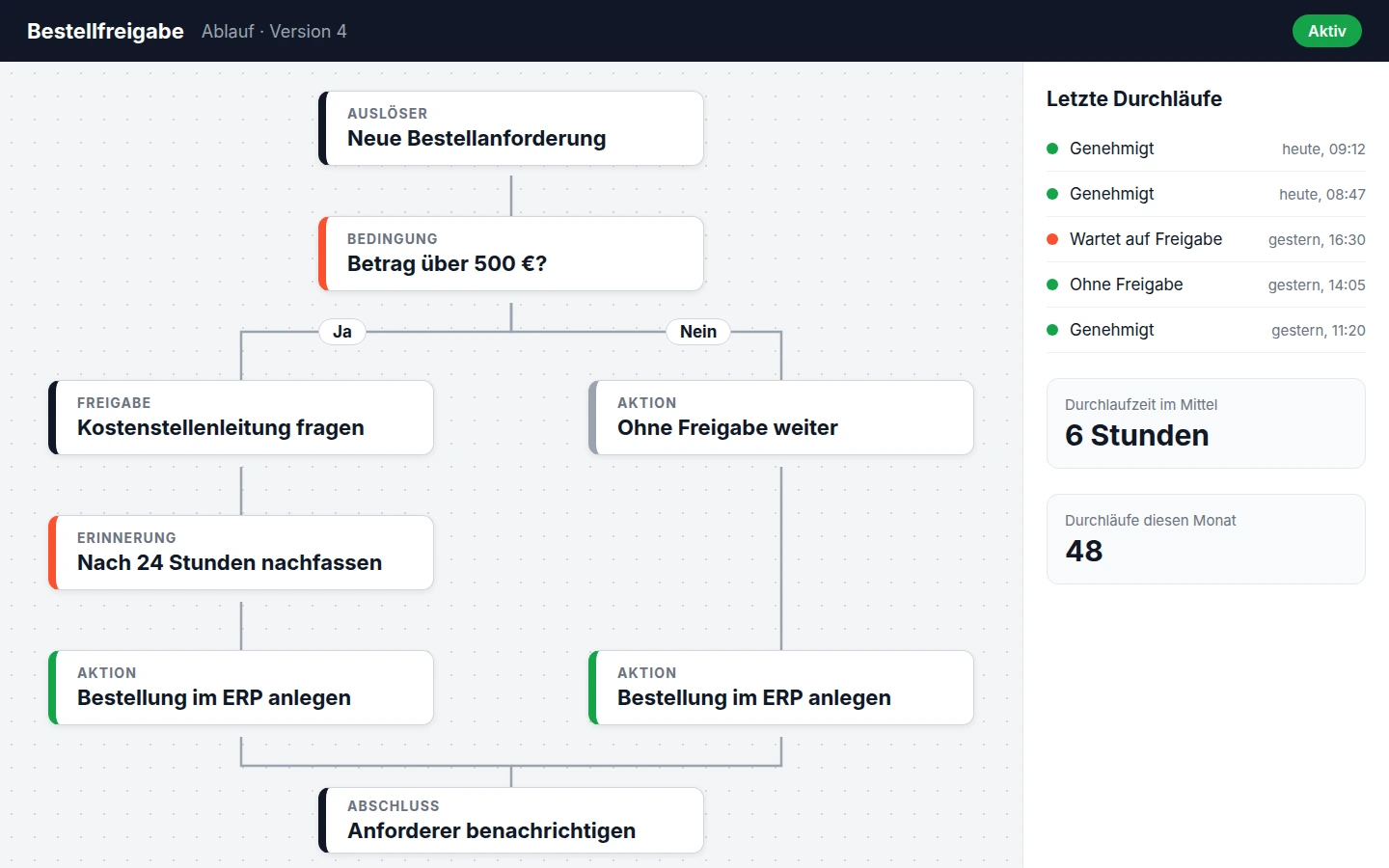
This is what an approval workflow looks like, regardless of the tool: a trigger, a condition, an approval with a reminder, and a log of every run. Schematic diagram, not a product screenshot.
RPA is a bridge, not a foundation. A software robot that operates an old interface is quick to build and rescues processes you couldn't otherwise reach. But it depends on every field and every button of that interface. In 2016, the consultancy EY noted from its projects with financial services firms that "as many as 30 to 50% of initial RPA projects fail", adding: "This isn't a reflection of the technology" (EY, Get ready for robots). EY attributes this to mistakes in selection and implementation, not to the software. Little has changed since: RPA is worthwhile as a stopgap with an expiry date, until the legacy system gets an interface or is replaced.
As soon as people make decisions, you need an app. A workflow transports data; it doesn't manage it. If employees need to enter, review and later retrieve data, the process needs forms, roles and a data model. With manageable logic and internal users, a low-code platform can handle this. For core processes with dense logic and many or external users, custom software often pays off over the years. Our article Having an App Developed covers the trade-offs in detail, and the guide to custom software development covers the fundamental question. If the process is tied to sales, meaning inquiries, quotes and follow-ups, it usually belongs in the CRM rather than in a separate workflow. You'll find more in the article on CRM consulting.
The hybrid: Dataverse as the data foundation, a custom app as the interface. Between low-code and fully custom development lies a path that is often overlooked. Microsoft Dataverse provides the data model, roles and permissions, and sign-in via Microsoft 365. Power Automate and Power BI can be connected directly, and the data resides in the selected region of the Microsoft cloud. The interface is developed individually, as a web, tablet or mobile app, and follows the process exactly, without the design limits of a low-code toolkit. This fits when four things come together: your own process is an advantage over the competition, several user groups work with it (including external ones), the company already uses Microsoft 365, and reporting and automation should be part of it from the start. Before building, clarify how much Dataverse capacity and which access licenses you need; both vary depending on the scenario.
Not every annoying workflow is a good candidate, and not every good candidate is ready yet.
„Automation only makes a bad process bad faster. That's why every one of our projects starts with an hour of listening instead of a tool. And sometimes it ends with the advice not to automate anything at all.“
A simple formula with four conditions has proven itself: A process is worth automating if it is frequent, rule-based, stable and annoying.
If even one of the four conditions is missing, the automation usually ends up costing more than the problem.
Collect ten to fifteen candidates and sort them by benefit and effort. Benefit includes time, cost of errors and waiting time. For effort, what matters less is the number of steps than the number of systems, edge cases and people involved.
For one candidate, the timing is practically fixed: incoming invoices. Since January 1, 2025, every domestic company has had to be able to receive e-invoices. Until the end of 2026, issuers may still use paper, or PDF with the recipient's consent. With prior-year revenue of up to €800,000, that extends to the end of 2027. After that, the structured e-invoice is the norm between domestic companies (FAQ of the Federal Ministry of Finance; general overview, not tax advice). Structured invoice data is exactly the raw material an approval workflow needs.

Every matching and retyping step between paper and system is a candidate for the list. Photo: Kampus Production / Pexels
The costs consist of three parts: build, licenses, and maintenance. Almost all comparisons look only at the first.
The following ranges are based on experience from our projects with mid-sized companies. They are rules of thumb for planning, not fixed prices, and they apply to the build only, excluding licenses and operations.
| Project | Price range | Typical duration |
|---|---|---|
| Process workshop (analysis, prioritization, roadmap) | from €2,500 | a few days |
| Single automation | €3,000–15,000 | a few days to six weeks |
| App with data model and one to two integrations | €15,000–45,000 | two to four months |
| Custom software for core processes | €50,000–250,000 | three to nine months |
Every platform charges differently: per user, per flow, per execution, or per bot. Self-hosted open-source tools save on licenses but cost you in operations. So ask every vendor this question: "What will this cost at our user count and volume in year three?" We'll work through this using Microsoft as an example, because the prices there are public and many mid-sized companies already use Microsoft 365. The rights included in Microsoft 365 cover only standard connectors. For premium, on-premises, and custom connectors, Microsoft requires a separate license (Microsoft Learn, licensing FAQ). The pricing page lists the following, as of November 2026 and excluding VAT:
| License | List price (billed annually) | Billed per |
|---|---|---|
| Power Automate Premium | €13.00 per month | User |
| Power Automate Process | €130.00 per month | Flow or bot |
| Power Automate Hosted Process | €186.30 per month | Bot on a machine operated by Microsoft |
The difference determines budgets. Who needs a license depends on how the flow starts: if an event or a schedule triggers it, only the owner needs a Premium license, and anyone who only approves needs none. If 20 people start the flow themselves, by button or from an app, each of them needs one: €3,120 per year. A Process license for the same flow costs €1,560 and, according to Microsoft, applies regardless of which license the triggering person has. The prerequisite is that the flow sits in a solution; up to 250,000 actions per day are included (Microsoft Learn, license types, Power Automate licensing FAQ). Which option is permitted and cheaper in your case is something you clarify before building, not after.
An automation is software. Interfaces change, connectors are retired, and so do the rules inside your company. Based on experience, we budget 15 to 20 percent of the build costs per year for maintenance.
An example with deliberately cautious assumptions: invoice approval at a company with 200 incoming invoices per month and 20 people involved. The flow starts automatically with each incoming invoice and runs through a service account with one Process license. The hourly rate of €50 and the error costs are assumptions that you need to replace with your own figures.
| Item | Calculation | Amount |
|---|---|---|
| Time saved per year | 2,400 invoices × 6 minutes ÷ 60 × €50 | €12,000 |
| Avoided errors and lost early-payment discounts per year | Assumption | €1,500 |
| Build, one-time | Quote | €10,000 |
| Licenses per year | 1 Process license × €130 × 12 months | €1,560 |
| Maintenance per year | 18% of build costs | €1,800 |
Plotted over three years, the calculation looks like this:
Volume matters more here than any other assumption. With 50 instead of 200 invoices per month, the time saved would come to €3,000 per year, which is below the running costs of €3,360.
Worked example over three years
+€20,420
That's what's left after three years. Licenses and maintenance together cost as much as the build. If you only compare quotes for the build, you're comparing half the picture.
No big project, just a narrow path: one process, six phases, three months. The result is a solution that holds up in daily use, and a pattern for the second process.
Two phases are regularly underestimated.
Process documentation. Sit down for an hour with the people who run the process every day, and have them show you the flow on screen instead of describing it to you. While watching, the intermediate steps that nobody mentions in conversation come to light. That's where the edge cases hide. Ask about the last three cases that went differently than usual, and what happens when an error goes unnoticed. The answer determines how much error handling you need. Capturing requirements like these cleanly is the craft of requirements engineering.

Have them show you instead of tell you: the edge cases only appear while watching. Photo: Gustavo Fring / Pexels
Parallel running. Automations rarely fail during the build. They fail in the weeks afterward, on an edge case nobody wrote down, or on an error message nobody reads. Four weeks of running old and new side by side will uncover both, while the old way still works. Switch over only when both paths deliver the same results and it's clear who is watching from now on.
None of these mistakes is a technical problem, and every one of them can be avoided before you build anything.
Mistake 1
If you automate ambiguity, you get it faster. Clarify responsibilities and rules first, then build.
Mistake 2
When that person leaves the company, an orphaned flow is left behind. Microsoft describes it plainly: "An orphaned flow is a flow that no longer has a valid owner. These flows can fail if they use connections tied to that user account" (Microsoft Learn). That's why the owner should always be a service account.
Mistake 3
The license depends on the connectors and on how the flow is triggered, not on the effort to build it.
Mistake 4
If you can't answer the question "What happens when a step fails?", the automation is only half finished.
Mistake 5
Good as a bridge, expensive as a foundation.
Mistake 6
After two years, the solution turns into a legacy system.
Four guardrails help against most of these mistakes. They apply to every tool and should be in place before the first process goes live.
| Guardrail | Prevents | How to do it |
|---|---|---|
| Environments | Changes made in live operation | Separate development, test and production, before the first build |
| Service accounts | Silent failures when someone leaves | The owner is never a person, at the latest by go-live |
| Data policies | Company data in private accounts | Limit permitted connectors by policy, before teams start building on their own |
| Ownership | Orphaned flows | Name one person per process, at every handover |
Business departments are allowed to build for themselves, and that is the strength of low-code. In practice, a simple separation is enough: personal helpers are built freely in an environment of their own. As soon as a flow becomes important for a team or for customers, it moves into a managed environment and gets a service account, documentation and a business owner.
AI has arrived in companies, with mixed results, as the Bitkom survey shows.
of companies with 20 or more employees use AI
Bitkom, 2026of AI users report significantly faster internal processes
Bitkom, 2026of AI users report significantly higher costs than expected
Bitkom, 2026For AI agents that carry out several steps on their own, disillusionment is foreseeable: Gartner expects more than 40 percent of agent projects to be cancelled by the end of 2027, due to rising costs, unclear benefits and inadequate risk controls (Gartner, press release of June 25, 2025).
A traffic light system helps in practice.
Green, reliably usable:
Yellow, only with a human in the process:
Red, not without human review:
The red item on decisions about people is not a matter of taste. Art. 22 GDPR gives data subjects the right not to be subject to a decision based solely on automated processing that produces legal effects concerning them or similarly significantly affects them. The provision has exceptions, for example with explicit consent or where the decision is necessary for a contract. For AI in candidate selection, the obligations of the EU AI Act also apply, which classifies such systems as high-risk systems in Annex III. This section is a general overview and not legal advice.
AI doesn't replace the rule. It replaces the step for which there was previously no rule: reading, categorizing and drafting.
The process around it remains classic automation with fixed rules, a log and a responsible person. How to introduce AI in your team without it getting stuck in the pilot stage is described in the article Introducing AI in Your Team.
If more than two boxes are unchecked, do the groundwork first and the project second.
The detailed templates for this article are available as a free whitepaper to download: a question catalog for process capture, a process profile, an evaluation grid, a business case calculation and the complete checklist with ten items.
At Medienstürmer, we have the same processes as our clients: customer data, projects, receipts, approvals. Instead of connecting more and more individual tools, we built our own internal operating system, the Hub. CRM, projects and quotes are stored in Microsoft Dataverse, and the interface is a custom web application, which is exactly the hybrid approach described above. Our lesson from this: more important than choosing the tool is recognizing early on where "low-code is enough" turns into "this needs code." That is exactly what we check for our clients' processes as well. Our focus here is the Microsoft Power Platform, along with Make and custom software. If another tool fits better, we say so before any license costs arise.
A recurring task runs according to fixed rules, without anyone having to start it by hand or retype data. An event triggers the process, systems exchange the data, and people step in only for decisions and exceptions.
Process automation is the umbrella term. RPA is one of four tool classes: a software robot operates a program's user interface the way a human would. This makes sense when a legacy system has no interface. If an interface exists, workflow automation is more robust and cheaper to run.
A trigger starts a chain of actions through the interfaces of the systems involved, for example: an invoice arrives, the data is extracted, the responsible person approves it, and accounting receives the document. Tools for this include Power Automate, Make and n8n.
Processes that are frequent, rule-based, stable and annoying. Typical starting points for mid-sized companies are incoming invoices, purchase and leave approvals, onboarding new employees, and transferring orders from the shop into the ERP. Rare processes and those with many case-by-case decisions are poorly suited.
In our projects, building a single automation costs between €3,000 and €15,000, and an app with a data model costs between €15,000 and €45,000. These are figures from experience, not fixed prices. Licenses and maintenance come on top, and over three years they often add up to as much as the build itself. That's why you should always calculate over three years.
Partly. The included rights cover flows with standard connectors. Premium, on-premises and custom connectors require a separate license, for example Power Automate Premium at €13.00 per user per month (list price, plus VAT, as of November 2026). If an event or a schedule starts the flow, only the owner needs this license. Power Automate Desktop for attended flows on your own computer is included in the free license, while unattended robots require a Process license.
Building a single workflow automation takes a few days to six weeks. You should plan around 90 days until it runs reliably in production, because process mapping, parallel operation and handover take more time than the build.
No. AI takes over individual steps such as reading documents or categorizing requests. The process itself, with its rules, approvals and logs, remains classic automation. Under Art. 22 GDPR, decisions with legal or similarly significant effects on people, such as those about job applications, generally must not be made solely by automated means.
Process automation rarely fails because of the technology, and almost always because of the order of steps. First understand the process, then choose the tool, then calculate over three years, then build and run it. A workflow via interfaces is usually enough. RPA is only suitable as a stopgap, and where people maintain data and make decisions, you need an app. Start with exactly one process that is frequent, rule-based, stable and annoying, and give it a parallel run and a responsible owner.
We'll look at exactly one process with you and tell you honestly whether automation pays off or whether the money is better spent elsewhere.

Cover image: Collage by Medienstürmer using photos by Pavel Danilyuk and Kevin Malik (Pexels).