Powerapps: Canvas, Model-Driven and Power Pages Compared
The Microsoft Power Platform was first introduced in 2018 and has since become one of the most popular low-code platforms for businesses. Originally intended as a tool for IT departments to automate internal processes, it has now taken on a central role in the digitalization of many companies. In this context, the so-called "Citizen Developer" is gaining increasing importance. As our employee Florian Stocker describes in Computerwoche, platforms like the Power Platform enable not only professional developers but also business departments to independently create applications.
A key advantage of all three types of Powerapps – Canvas Apps, Model-Driven Apps, and Power Pages – is their shared data foundation: the Microsoft Dataverse. This central data platform ensures seamless integration and facilitates data exchange between applications. In this article, we explain which type is the best choice when and highlight the pros and cons.
The Basics: What are Powerapps?
Powerapps are a central component of the Microsoft Power Platform and offer ways to create custom applications with little to no code. They are ideal for digitizing business processes, optimizing workflows, and developing modern user interfaces.
Canvas Apps: Design Freedom and Flexibility
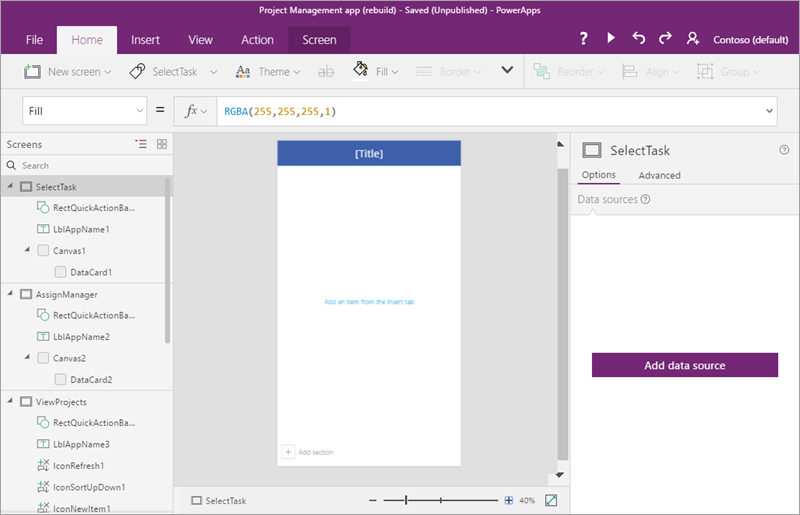
Canvas Apps offer high flexibility in designing the user interface. They allow developers to freely define the design and functionality without being bound to predefined structures. This makes Canvas Apps particularly suitable for applications where the user experience is paramount. The design process is similar to a blank canvas, where elements like buttons, forms, or images can be placed freely. The focus is on the individual customization of the design, with the developer having almost complete freedom to decide how the app looks and functions.
When are Canvas Apps useful?
Canvas Apps are ideal for:
- Mobile applications or desktop solutions with custom interfaces.
- Scenarios where user interactions and visual design are paramount.
- Data access from various sources, such as SharePoint, Excel, or SQL databases.
Advantages:
- Complete design freedom.
- Quick and easy to customize.
- Integration of various data sources.
Disadvantages:
- Limited scalability for complex business processes.
- Less suitable for data-driven applications.
Model-Driven Apps: Process Optimization and Data Focus
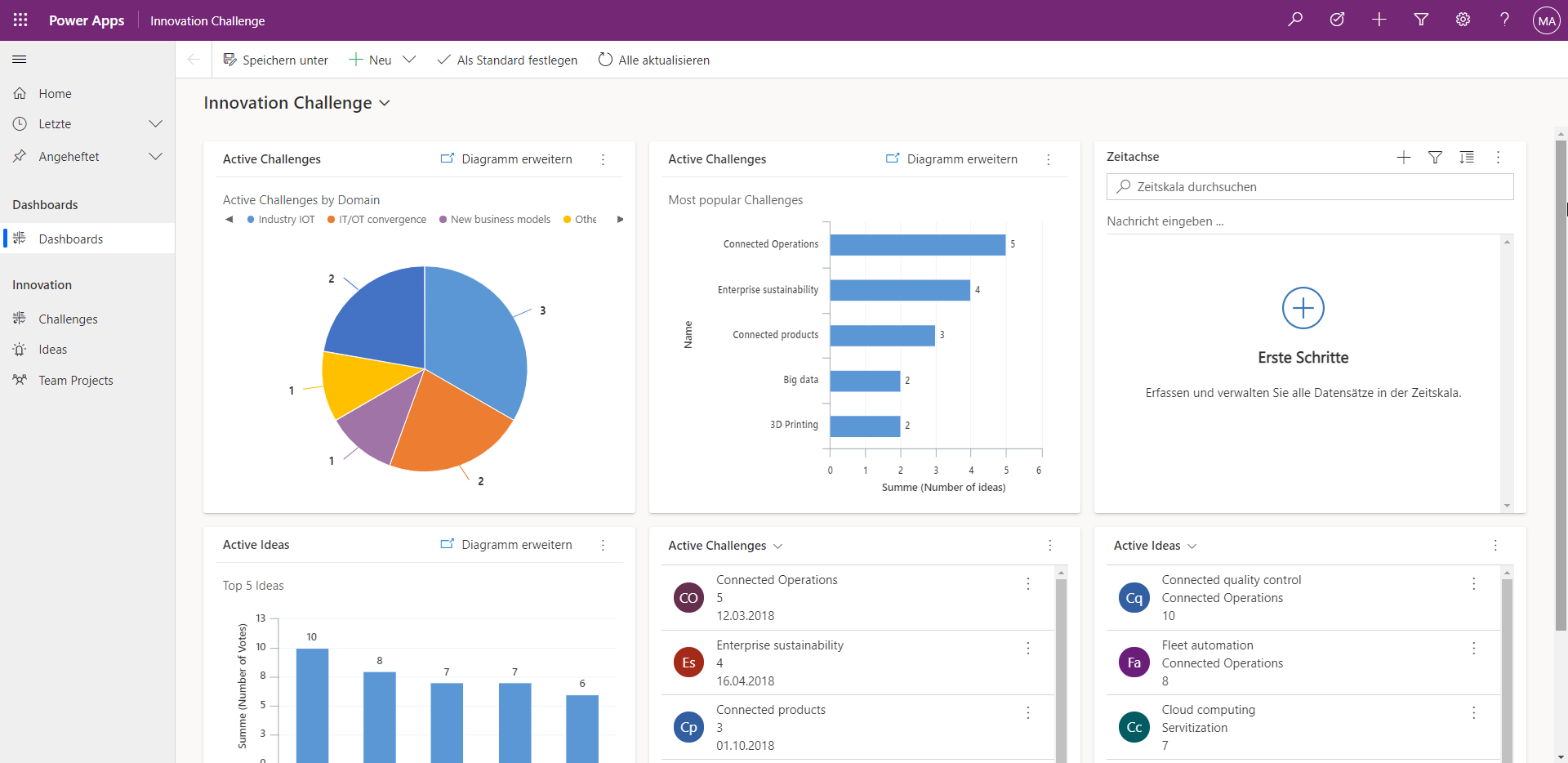
Unlike Canvas Apps, the development of Model-Driven Apps is based on data and business processes. These apps follow a data-driven approach, where the user interface is automatically generated from the underlying data model and defined logic. Developers can focus on optimizing processes and modeling data structures without spending much time on manual interface design. With integrated features like dashboards, charts, and forms, Model-Driven Apps are particularly effective in clearly presenting business-relevant information.
When are Model-Driven Apps useful?
Model-Driven Apps are excellent for:
- Applications with complex data structures and relationships.
- Scenarios where efficiency and process automation are paramount.
- Mapping CRM or ERP-like systems.
Advantages:
- Focus on data and processes.
- Automatically generated and optimized user interfaces.
- Scalable for large applications.
Disadvantages:
- Less design flexibility for custom interfaces.
- Dependence on a predefined data model.
Power Pages: Modern Web Development with React
Power Pages are the perfect choice for web-based applications and portals. Originally known as "Power Apps Portals", they have been further developed to enable companies to create user-friendly and secure websites. They offer native features like authentication, data integration, and responsive designs, accessible to both internal employees and external users.
With Power Pages, companies can not only provide content but also create dynamic user experiences. Power Pages go beyond traditional low-code development and offer companies a platform to create scalable, user-friendly websites. Our approach to integrating React Single-Page Applications (SPAs) into Power Pages combines this modern web technology with the robust infrastructure of the Power Platform.
The result: High-performance applications that offer both internal users and external customers a modern and efficient user experience.
When are Power Pages useful?
Power Pages are used when:
- Corporate portals or customer platforms need to be created.
- Seamless integration of external users is necessary.
- Modern frontend technologies like React are desired.
Advantages:
- Perfect for web-based applications.
- Responsive design for all devices.
- Ability to use React SPAs to create modern and interactive frontends.
Disadvantages:
- Higher technical requirements when integrating React.
- Initial effort in integrating external technologies.
Are outdated processes holding your company back while others are digitally ahead?
With the Power Platform, you create efficient solutions, optimize your processes, and develop custom apps – quickly, flexibly, and without programming effort. Let's take your digitalization to the next level together.
Request a free initial consultation and get started!
When should I use which type of Powerapp?
The choice of the appropriate app type depends on the individual requirements:
| Application Scenario | Recommended App Type |
|---|---|
| Custom mobile or desktop interfaces | Canvas Apps |
| Data and process-oriented applications | Model-Driven Apps |
| Web-based platforms or portals | Power Pages |
A practical example: Imagine a comprehensive customer portal that meets the specific requirements of different user groups. Power Pages form the foundation here by creating a modern, user-friendly web interface that, with a React Single Page Application, offers an interactive and dynamic user experience. The content of this portal is efficiently managed by internal employees through a Model-Driven App. Additionally, specific data or feedback can be playfully and flexibly captured by other employees using a Canvas App. This interplay ensures that both internal and external processes are optimally covered.
Conclusion
The choice between Canvas Apps, Model-Driven Apps, and Power Pages strongly depends on the requirements of your project. While Canvas Apps offer maximum flexibility for custom designs and are ideal for interactive and user-friendly interfaces, Model-Driven Apps are the perfect choice for data-driven processes and applications with complex structures. Power Pages also offer the unique opportunity to develop modern web applications with React while benefiting from the scalability and integration capabilities of the Power Platform.
By using Microsoft Dataverse as a central data foundation, these tools enable seamless collaboration and consistent data management – a crucial advantage for companies looking to advance their digital transformation.